
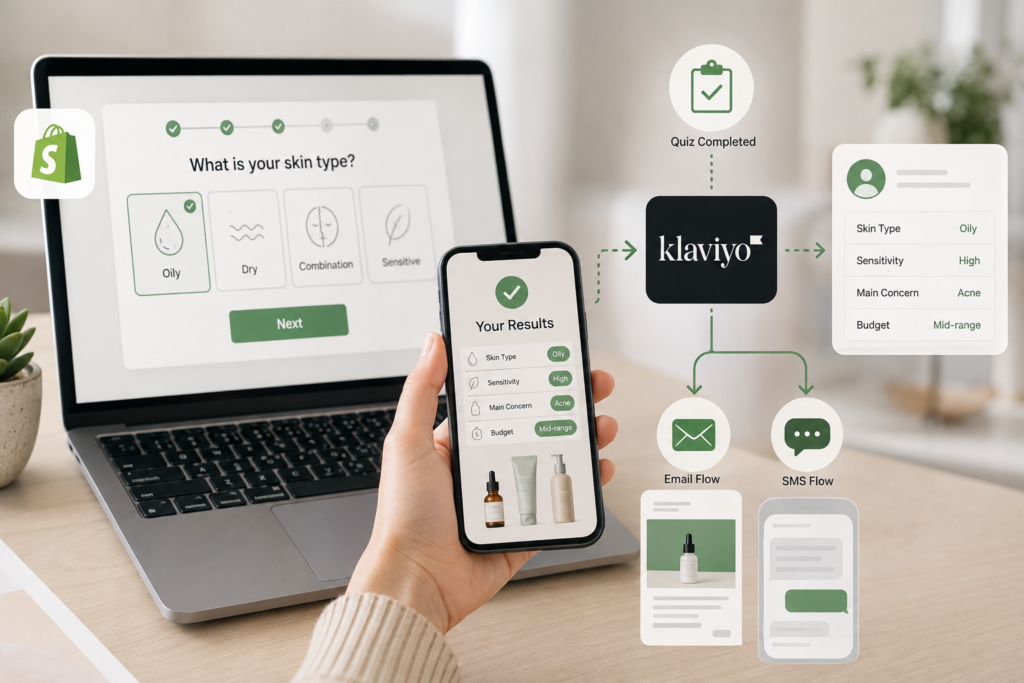
Most Shopify stores collect the same five data points on every visitor: email, name, maybe a birthday, and whatever pages they clicked. That’s thin material for personalized marketing. A Shopify quiz builder changes that equation by asking customers direct questions about their preferences, then feeding those answers straight into Klaviyo, where they become the foundation for flows that actually speak to the person reading them.
The upside is measurable. Global online sales are projected to make up 20.5% of worldwide retail sales in 2025, and merchants are competing for that share with sharper personalization, not louder discounts. A well-connected Shopify quiz builder is one of the more practical ways to get there, since it captures first-party data at the exact moment a shopper is willing to give it.
Why Quiz Data Beats Basic Email Segmentation
Standard Klaviyo segments rely on behavioral signals: what someone bought, what they clicked, how many days since their last order. Those signals are useful, but they describe what happened after the fact. Quiz data describes intent before a purchase even occurs, which is a very different kind of input for a flow trigger.
The Problem With Generic Klaviyo Flows
A generic “welcome series” treats every new subscriber the same way regardless of what they actually need. That’s a missed opportunity, since automated flows already outperform one-off campaigns by a wide margin. Klaviyo’s own benchmark data shows that flow-based emails generate roughly three times the click rate of campaigns (5.58% versus 1.69%) and thirteen times the placed order rate. Feeding a Shopify quiz builder’s answers into those flows is how you turn a decent automation into a genuinely relevant one.
What Zero-Party Data Actually Solves
Zero-party data is information a customer volunteers on purpose, as opposed to data inferred from browsing behavior. A skincare shopper who tells you their skin is oily and sensitive has given you something a pixel never could. That single data point can route them into a completely different email sequence than someone who reports dry, mature skin, without any guesswork on your end.
Setting Up Your Shopify Quiz Builder for Klaviyo Sync
Before mapping any answers, the quiz itself needs a clear structure. Each question in your Shopify quiz builder should map to one specific piece of information you plan to use later, not a vague theme. Think in terms of properties: skin type, dog age, fitness goal, budget range, rather than open-ended prompts that are hard to categorize.
Most Shopify quiz apps, including Visual Quiz Builder, connect to Klaviyo through a native app integration or OAuth connection rather than manual CSV uploads. Once authorized, the quiz app can push both events (quiz started, quiz completed) and properties (the specific answer values) directly to the matching Klaviyo profile. This removes the need for a developer to write custom API calls for a standard setup.
Mapping Quiz Answers to Klaviyo Profile Properties
This is the part that turns a fun on-site quiz into an actual marketing asset. Every answer a shopper gives can become a custom property on their Klaviyo profile, and every property can become a filter for segments or a trigger condition for a flow.
Step 1: Assign a Property Name to Each Answer
Inside the quiz builder Shopify merchants use for setup, each question gets a backend property key, something like skin_type, dog_life_stage, or primary_goal. Keep these names consistent and short, because you’ll be referencing them repeatedly inside Klaviyo’s segment builder later. A messy naming convention now means confusing flow logic in three months.
Step 2: Sync the Properties to Klaviyo Profiles
When a shopper submits the quiz, the app sends a “Quiz Completed” event along with the property values attached to their profile. In Klaviyo, this shows up under the profile’s properties tab, sitting alongside standard fields like location or order count. From there, those quiz properties are queryable the same way any native Klaviyo property is.
Step 3: Build Segments From the Synced Data
With properties in place, you can build segments like “skin_type equals oily AND sensitivity equals high,” which is far more precise than anything derived from purchase history alone. A Shopify quiz builder that pushes clean, structured properties makes this step almost mechanical rather than a manual data-cleaning project.
Step 4: Trigger Flows Off Quiz Completion or Specific Answers
Klaviyo flows can trigger off the “Quiz Completed” metric itself, or off a metric plus a property filter, so a customer who answers “senior dog” only enters the mobility-focused sequence, while a “puppy” answer routes into a completely different one (in case of the dog-related quiz). This is the mechanism that makes hyper-segmentation possible without hiring someone to manage a hundred manual lists.
Real Results: Brands Using Quiz-to-Klaviyo Sync
Facetheory’s skincare routine quiz walks shoppers through questions about skin type, sensitivity, and specific concerns like breakouts or dullness. Because the Shopify quiz builder behind it syncs answers to Klaviyo, each quiz taker lands in an email sequence built around their stated skin profile instead of a one-size-fits-all newsletter. Someone who flags acne-prone skin gets content and product suggestions relevant to that, not a generic “new arrivals” blast.
Common Mistakes to Avoid
A few setup errors show up repeatedly on stores that skip planning before building their quiz.
- Naming properties inconsistently across quiz versions, which breaks existing segments when you edit a question later.
- Asking questions that don’t map to any planned flow, which just adds friction without adding marketing value.
- Forgetting to test the sync with a real Klaviyo profile before launching the quiz to live traffic.
Each of these is easy to prevent by mapping your flows on paper first, then building the quiz questions to match, rather than the reverse.
Frequently Asked Questions
Does every Shopify quiz builder support Klaviyo integration?
No. Some apps only export data as a spreadsheet or connect to email tools through third-party automation platforms like Zapier. Check for a native Klaviyo integration before committing to a specific quiz builder Shopify app, since native connections sync properties and events automatically without extra middleware.
How many quiz questions should I include before sync becomes overkill?
There’s no fixed number, but shorter quizzes tend to finish at higher rates. Five to eight focused questions is a reasonable range for most product-recommendation quizzes, since each additional question adds drop-off risk without necessarily adding useful data.
Can I trigger an SMS flow from quiz data too?
Yes, if your Klaviyo account has SMS enabled and the quiz app collects phone numbers. The same property-based trigger logic used for email flows applies to SMS flows.
What happens if a customer retakes the quiz with different answers?
Most integrations overwrite the existing property values with the latest answers, so segments update automatically. It’s worth confirming this behavior in your specific app’s documentation, since a few tools append rather than overwrite.
Is quiz data GDPR-compliant for email marketing?
Quiz data is generally considered strong from a compliance standpoint because customers submit it voluntarily and with clear context about why they’re answering. That said, you still need proper consent language and an opt-in step before adding anyone to marketing flows, regardless of how the data was collected.




























1 Comment on "How to Sync Your Shopify Quiz Builder with Klaviyo for Hyper-Segmented Email Automation"
Would you like to share your thoughts?
Your email address will not be published. Required fields are marked *