
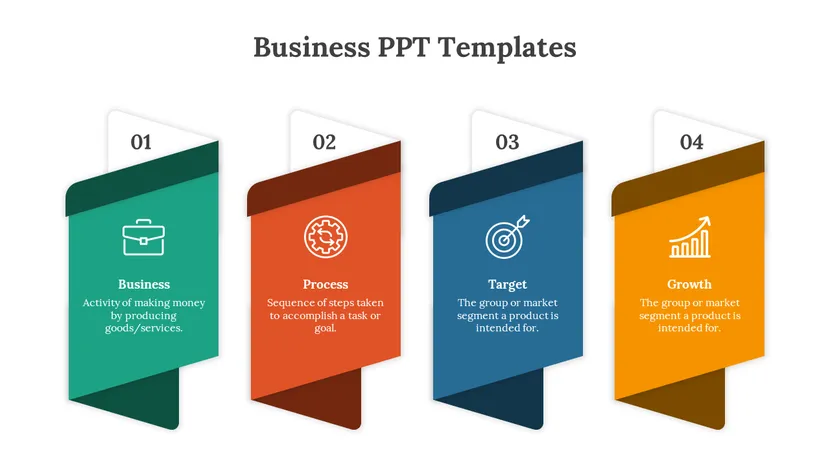
Elevate Your Visual Storytelling with These Downloadable PPT Templates
We have all been there. You are sitting in a dimly lit conference room or staring at a Zoom screen, listening to a presenter drone on while a slide packed with 15 bullet points and a generic blue background hovers on the screen. Your attention drifts. You check your phone. The message is lost.
The truth is, having a compelling narrative is only half the battle. In today’s fast-paced digital landscape, how you present that narrative is just as critical as the story itself. Whether you are a business executive pitching to stakeholders, a teacher trying to engage students, or a creative professional showcasing a portfolio, the visual component of your presentation acts as the hook that keeps your audience reeling in.
However, not everyone is a graphic designer. The prospect of staring at a blank white slide and trying to construct a visually stunning deck from scratch is daunting and time-consuming. This is where high-quality PPT templates come into play. They bridge the gap between your raw ideas and professional execution, allowing you to focus on your message rather than worrying about pixel-perfect alignment.
In this guide, we will explore the science of visual storytelling, why you should stop designing from scratch, and where to find the best free resources—including the impressive library at AiPPT—to transform your next presentation.
The Science of Visual Storytelling
Why do some presentations stick in our minds for years, while others are forgotten the moment we leave the room? The answer often lies in the psychology of visual storytelling.
Human beings are wired for visuals. According to the “Picture Superiority Effect”, concepts are much more likely to be remembered if they are presented as pictures rather than words. In fact, research suggests that the human brain processes images 60,000 times faster than text. When you force your audience to read long paragraphs on a slide while simultaneously listening to you speak, you are creating “cognitive load.” Their brains have to choose between reading and listening, and usually, they stop doing both effectively.
Visual storytelling alleviates this burden. It uses design elements, such as imagery, typography, color, and layout, to guide the audience’s eye and evoke emotion. A well-designed slide doesn’t just display data; it tells you how to feel about that data.
- Color Theory: Warm colors can incite urgency or passion, while cool blues often convey trust and stability.
- Typography: A bold, sans-serif font might scream “innovation”, while a classic serif font whispers “tradition and authority”.
- Imagery: High-quality photos can create metaphors that explain complex concepts instantly.
Professional PPT templates are built with these psychological triggers in mind. They aren’t just “pretty backgrounds”. They are structured visual frameworks designed to support a narrative flow. By utilizing a pre-made visual structure, you are essentially borrowing the expertise of a professional designer to help your audience understand and retain your story.
Starting from Scratch vs. Using Templates
There is a common misconception that using templates makes you “lazy” or “unoriginal”. In reality, the most efficient professionals in the world rarely start from a blank canvas. Time is a finite resource, and spending five hours aligning text boxes is rarely the best use of it.
The Efficiency Factor
Creating a cohesive design system for a presentation involves choosing a color palette, selecting font pairings, creating master slides, and designing custom layouts for charts and images. If you are starting from zero, this setup alone can take hours before you even type your first word of content. Downloading a template allows you to bypass the technical setup and dive straight into content creation.
The Consistency Problem
One of the biggest markers of an amateur presentation is inconsistency. Perhaps the headers jump around from slide to slide, or the shade of blue changes slightly halfway through the deck. These small errors distract the audience and erode your credibility. High-quality templates solve this by providing a unified design language. The margins, font sizes, and color schemes are locked in, ensuring that Slide 20 looks just as polished as Slide 1.
Flexibility and Compatibility
It is important to note that when we talk about modern templates, we aren’t talking about static, unchangeable background images. The best resources today provide fully editable files. Whether you prefer Microsoft PowerPoint or Google Slides, modern PPT templates are designed to be taken apart and put back together. You can change the colors to match your brand, resize the shapes, and swap out the icons. You get the structure of a professional design with the flexibility to make it your own.
Top Resources for Storytelling Templates in 2026
So, where do you find these elusive, high-quality designs? The internet is flooded with template sites, but many of them are outdated, expensive, or require complex subscriptions. However, there are hidden gems that offer premium-quality visuals without the premium price tag.
One resource that has been gaining significant traction among presentation professionals is AiPPT.
Spotlight on AiPPT
If you are looking for a resource that balances aesthetic appeal with usability, the AiPPT template library is a standout option. Unlike many legacy sites that host designs from the early 2000s, AiPPT focuses on modern, clean, and trend-conscious designs that align with current visual standards.
Here is why this platform is becoming a go-to for storytellers:
- Professional Aesthetics: The designs found at AiPPT cover a wide spectrum of styles, from minimalist corporate decks to vibrant creative portfolios. The designers behind these templates clearly understand the principles of visual hierarchy and white space, ensuring that your content breathes.
- 100% Free to Use: One of the most compelling aspects is the cost—or lack thereof. AiPPT provides access to these premium-tier designs for free. This is particularly valuable for students, non-profits, and startups operating on lean budgets who still need to look million-dollar professional.
- Downloadable and Editable: AiPPT respects the user’s workflow. They understand that while AI tools are popular, most users still want to edit their slides in the software they know best. You can browse their library, find a style that fits your narrative, and download the file directly. Once downloaded, these PPT templates are fully compatible with Microsoft PowerPoint and can easily be imported into Google Slides. This means you have total control over every element on the screen.
- Scenario-Based Variety: Whether you need a pitch deck for investors, a lesson plan for a history class, or a quarterly report for your boss, the categorization makes it easy to find a layout that matches the “mood” of your story.
By leveraging a resource like AiPPT, you are essentially hiring a graphic design team for free. You download the foundation, and then you build your house upon it.
How to Choose the Right Template
With so many options available, how do you select the one that fits your specific story? A template that works for a tech startup might be disastrous for a medical research presentation. Here are a few criteria to guide your selection:
Know Your Audience
Who are you speaking to? If you are presenting to a board of directors, look for “Business” or “Corporate” styles that utilize deep blues, greys, and structured grid layouts. If your audience is a room full of designers or students, you can afford to take risks with “Creative” templates that use bold typography and vibrant, abstract shapes. The design should never distract from the message; it should amplify it.
Look for Layout Diversity
Don’t just judge a template by its cover slide. A great template pack should include a variety of internal slide layouts.



























1 Comment on "Elevate Your Visual Storytelling with These Downloadable PPT Templates"
Would you like to share your thoughts?
Your email address will not be published. Required fields are marked *