
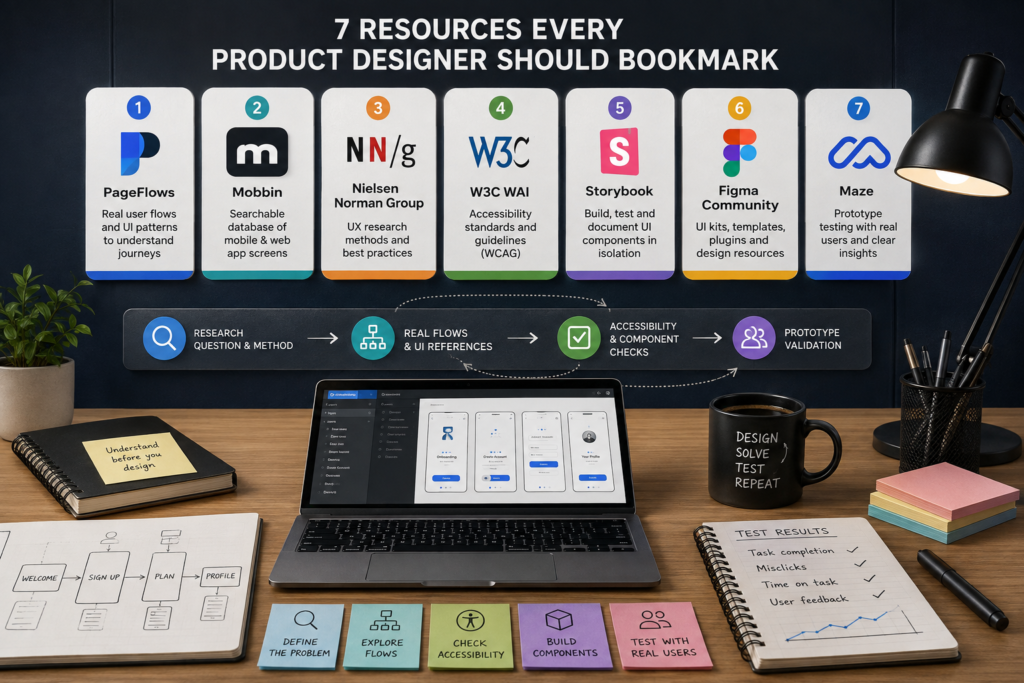
Product design moves from research to onboarding, accessibility, components, and testing. A useful bookmark folder should cover those different jobs. The best resources answer a specific question at the right moment. This list follows that idea.
Seven Resources That Cover the Product Design Process
These resources cover research, UI references, user flows, accessibility, components, reusable material, and validation. Some belong near the start. Others become useful after a direction exists. The key is matching the resource to the current question.
1. PageFlows
pageflows.com focuses on recorded user flows, app screens, and UI patterns. Its flow library includes onboarding and checkout journeys. Designers can study how screens connect instead of judging each alone. That helps when the main question concerns order and journey structure.
It also covers web and mobile experiences. That helps when one problem appears across different interfaces. The value is not copying a flow. It is seeing how real products divide tasks into steps.
2. Mobbin
Mobbin provides a searchable collection of mobile and web app screens. Its library includes screens, UI elements, and flows. It works well when several products need comparison around one problem. It is useful before a direction becomes too narrow.
3. Nielsen Norman Group
Nielsen Norman Group is useful when the uncertainty is about research rather than appearance. Its UX material covers methods across product development. These include usability testing, interviews, card sorting, and heuristic evaluation. The value is choosing a method that matches the question.
4. W3C WAI
W3C Web Accessibility Initiative publishes standards and guidance for accessible digital experiences. Its resources include WCAG information and design tips. Designers can consult them for contrast, labels, interaction states, and related decisions. Accessibility belongs in the design process before the interface is finished.
5. Storybook
Storybook is made for building, testing, and documenting UI components in isolation. Components can be viewed in specific states without navigating through a full product. This helps repeated interface parts stay clear across design and development. It also exposes states polished mockups may miss.
6. Figma Community
Figma Community contains UI kits, wireframes, templates, plugins, widgets, and shared design files. Resources can be searched and filtered by type. Community files can be duplicated into an account. It helps when a designer needs reusable material rather than another gallery.
7. Maze
Maze supports usability and prototype testing with real participants. Studies can report completion, misclicks, duration, and task paths. It becomes useful after a design direction exists but still needs evidence. The focus moves from appearance to task completion.
A familiar pattern is still a hypothesis in a new context. Testing can expose where it stops working. This keeps inspiration from becoming the final argument. It gives the team a reason to revise.
Put the Resources in the Same Order as the Work
A bookmark folder works better when its order follows the project. Research should clarify the problem before references shape answers. Flow research can then show how real products structure similar tasks. Accessibility and component checks can follow later.
A compact order can be:
- Research question and method
- Real user flows and UI references
- Accessibility and component checks
- Prototype validation
The order can change. A usability test may send the team back to flow research. An accessibility issue may change a component. New research may remove a step from the journey.
Product design rarely moves in a straight line. The folder should support returning to earlier questions. Each resource should make the next decision easier. If it does not, it probably does not need a permanent place.
The Best Resource Set Is Usually Smaller Than Expected
More bookmarks do not automatically produce better research. Overlapping galleries can increase browsing without improving the decision. A smaller set works better when each resource has a separate purpose. The designer spends less time choosing where to search.
There is also a useful separation between inspiration and evidence. A flow library can reveal common sequences, but it cannot prove that the same sequence will work for another audience. Accessibility guidance adds constraints that screenshots may not reveal. Validation then checks whether the proposed answer survives real use.
Combining different resource types is often more productive than hunting for one perfect reference. A flow can suggest structure. A screen collection can widen the options. Component work can make a selected pattern repeatable. Testing decides whether it deserves to stay.
That is a better definition of bookmark worthy. The strongest resource is not necessarily the one with the biggest archive. It is the one that shortens a specific decision at a specific stage. A seven resource folder can therefore be more useful than a hundred saved links.






















3 Comments on "7 Resources Every Product Designer Should Bookmark"
Would you like to share your thoughts?
Your email address will not be published. Required fields are marked *